We are thrilled to announce that BetterLinks, the leading link management plugin, has been nominated for Monster’s Award 2023 under the category ‘Best WordPress Optimization Plugin.’ This prestigious award, now in its third year, recognizes the outstanding performance and exceptional features of BetterLinks in helping website builders worldwide create, manage, and track any site URLs effortlessly.
Did you know an Economics principle states that you can reap more than 80% benefits or outputs by putting in only about 20% effort? And the best part is that you can incorporate this approach into many sectors of business – including Affiliate Marketing SEO. So, if you are an affiliate marketer seeking to grow your business and want to optimize your content for SEO, this comprehensive guide is for you!
As of 2023, affiliate marketing has a market value of over $17 Billion. Undoubtedly, it is also one of the more profitable business models an aspiring marketer can venture into. While many might believe starting an affiliate marketing business requires a hefty amount of money, it is quite the opposite. So if you are someone who wants to start his own career as an affiliate marketer, but you are worried about how to get started, you’ve come to the right place. Today, with this detailed guide, we are here to walk you through all the steps you need to start affiliate marketing with no money!
Want to know what people are talking about the most online? Knowing all the top trending topics that are a rage now can help you strategize all your marketing campaigns and business ideas. And to help you do just that, we bring you a complete list of all the topics of conversation that guarantee success.
Planning to add a complete documentation solution to your website, but not sure whether to host your own knowledge base (KB) or use an external one? We understand that there are benefits to both which lead to boosted engagement rates, and choosing the right option for your business can be a tough decision. But worry no more, because with this blog, we bring you a complete guide of everything you need to know to make the perfect choice of KB for your company.
About to kickstart your career as a successful affiliate marketer? If so, did you know there are many types of affiliate marketing programs to choose from? Well, no worries if not, because with this detailed guide, we are here to help you choose the best digital marketing strategy for your affiliate goals, boost conversions, and make a fortune.
Want to add a fully responsive WordPress logout link to your website’s navigation menu? If you run a website with multiple user roles, a membership site, bbPress forum, eCommerce store, or a learning management system (LMS), having a logout link can be really helpful. And to help you do just that, we bring you a complete guide. So without further ado, dive right in.
How To Add The WordPress Logout Link To Navigation Menu [2026] 23
Why Add A WordPress Logout Link To Your Navigation Menu?
The WordPress logout link looks like this:
http://example.com/wp-login.php?action=logout
You need to replace the “example.com” with your WordPress website’s domain name.
This link will immediately log you out of your WordPress session. When you go to this logout link, you’ll see a notification saying that if you really want to log out, click the logout option and you’ll be taken off the website.
How To Add The WordPress Logout Link To Navigation Menu [2026] 24
On a WordPress website, as an admin, you can easily log out from the admin bar in the top right corner whenever you want. So why do you need a WordPress logout link? If there are multiple users working on your WordPress alongside you in other user roles, they might want to logout from their accounts easily.
Apart from that, when your website has numerous user roles, you might hide the admin bar, and there are a variety of other reasons to do so. So, if you add your logout to the navigation bar, you may easily log out of the website without using the admin panel.
Ensure A User’s Privacy With A WordPress Logout Link In Nav Menu
Many times, a user may be concerned about sharing personal details while signing up to your website for privacy concerns. You will find many interested website visitors who simply do not become a user for this very reason.
However, if you add a very visible WordPress logout link to your site’s fully responsive navigation menu, it might give them the assurance they need to get started. Users will know they can log in, explore the website, purchase whatever they need, and later log out with just a single click.
Check out some of the use case scenarios where your site users might want to access the WordPress logout instantly:
🛑 When There Are Multiple Users In Your WordPress Website
As we have mentioned earlier, if there are multiple users with access to your website’s admin panel, might want to protect your own privacy by limiting their access to your site. And this includes hiding the admin panel from your particular users.
At times like this, you can add a WordPress logout link on the website frontends’ navigation menu from where they can easily logout within a single click. That way both your privacy and their user satisfaction will remain intact.
🛑 When A User Logs In To Their Account From A Public Device
How To Add The WordPress Logout Link To Navigation Menu [2026] 25
A lot of your site users may use a device that belongs to someone else or isn’t private. Especially if a majority of the users are college-goers or of the working-age – it is more than likely that they will be using public devices.
These users will definitely prefer using your WordPress website if you provide them with a logout link in the navigation menu. They will know they can easily sign out of their account and keep their detail private and secured; away from prying eyes who might also use the public devices afterward.
🛑 When Users Need To Send Their Devices For Maintenance
On the other hand, there are times you just need to send your laptop or phone to the maintenance store for repair. Although the chances are very slim, no one wants to take the risk of allowing anyone to access to their personal information. So, it’s best practice to log out from your accounts.
Your website users would prefer to do the same. And you can easily ensure that their user experience from your site is the best by adding a WordPress logout link to the navigation menu, from where they can easily access the link whenever and on whichever web page they are exploring.
How To Add The WordPress Logout Link To Navigation Menu
Table multiple users to logout of the system or website directly from the navigation bar in your website, you can follow the easy steps given below.
Add Logout Link Directly From Your WordPress Dashboard:
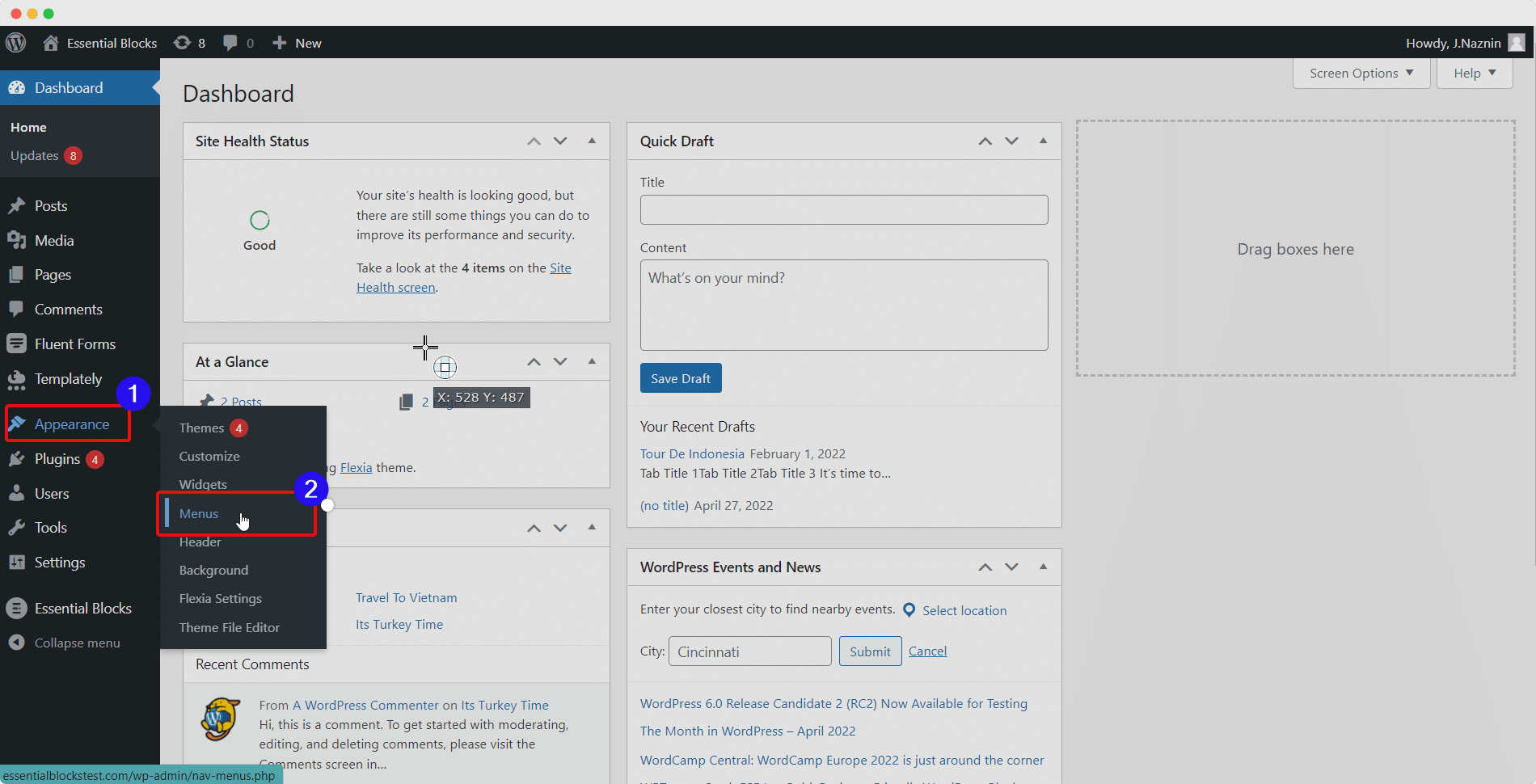
Without a doubt, you will need to log in to your own admin account to get started with this process. Then, once you’re in the dashboard, simply go to the ‘Appearance’ option from the left-hand side panel and click the option for ‘Menus’, as shown below.
How To Add The WordPress Logout Link To Navigation Menu [2026] 26
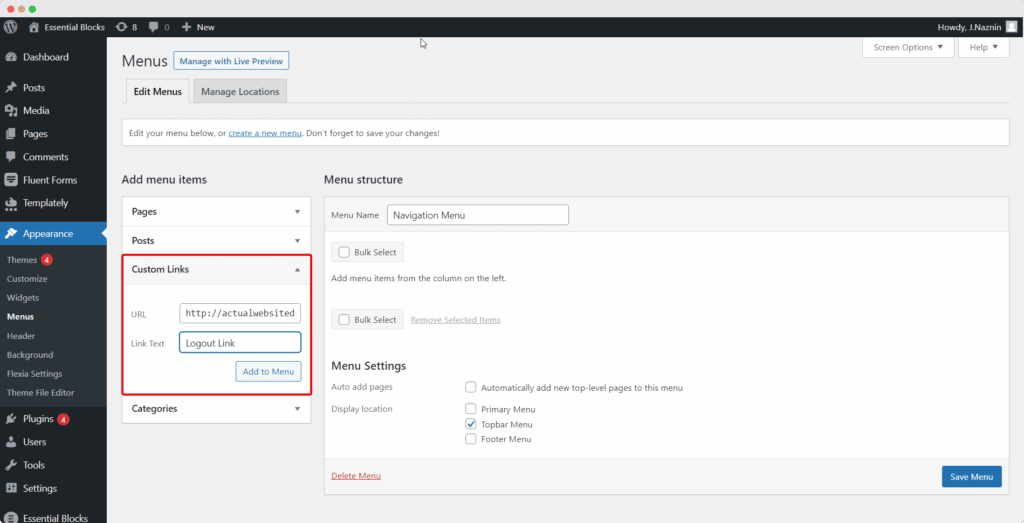
Next, when you get to the ‘Menu’s screen, simply select ‘Top Bar’ and then press on the ‘Add to Menu’ button, to add to the navigation menu.
You will need to click the option for ‘Custom Links’ in the left column. This will open the settings menu for the link to help you create the WordPress logout link that you can customize according to your preference and set in the nav (Navigation) bar.
How To Add The WordPress Logout Link To Navigation Menu [2026] 27
In the ‘URL’ field, paste the URL of the link – the link we talked about at the beginning of this guide. But be sure that you need to insert the actual link (containing your website’s domain name) in this input field.
You can also find another field right below that – the ‘Link Text’ input field. Here you can enter any custom text that you think will make proper meaning, such as ‘Logout’ or something similar in this case.
How To Add The WordPress Logout Link To Navigation Menu [2026] 28
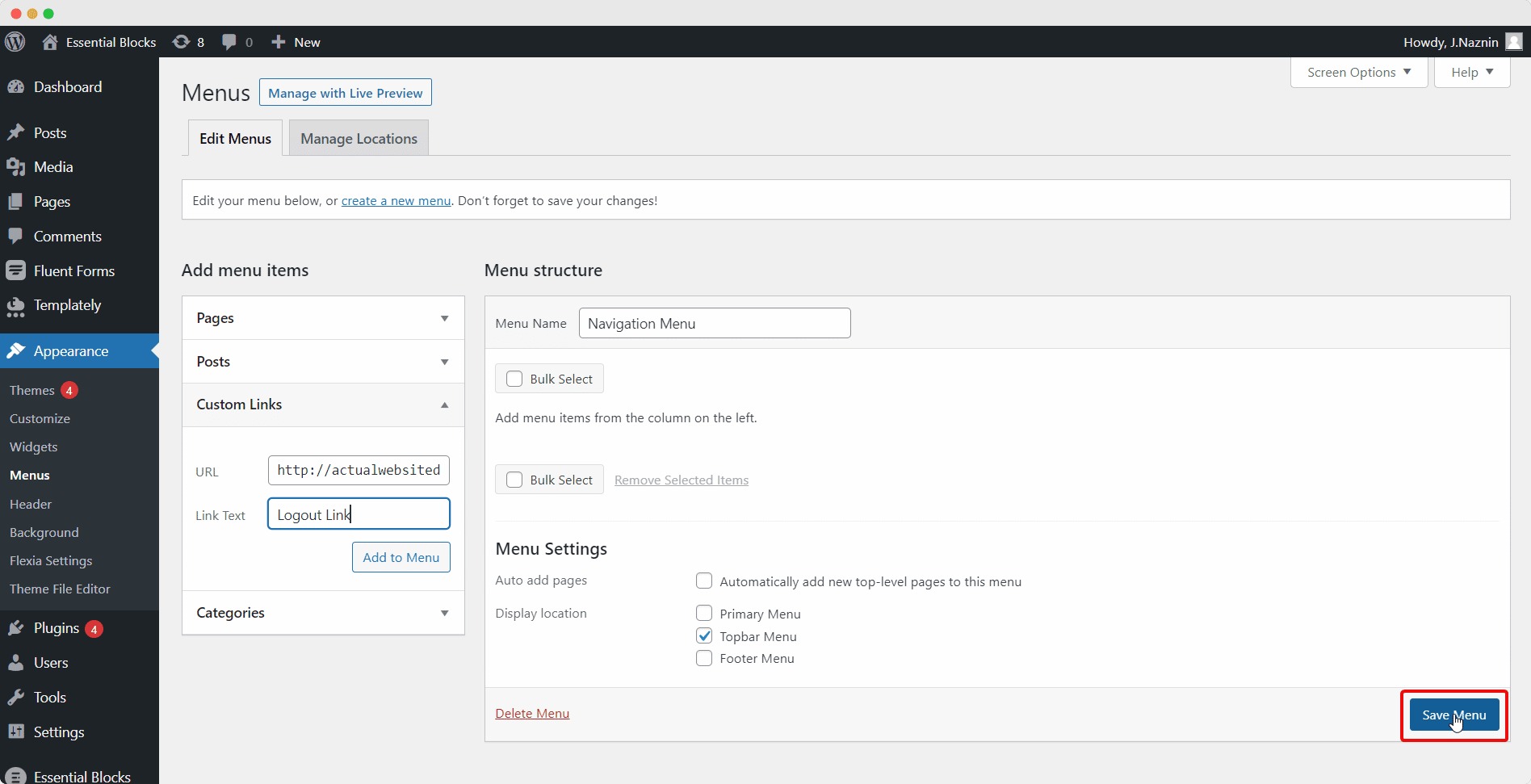
Finally, click the ‘Save Menu’ button on the right side of the screen. And that’s it, the WordPress logout link will be displayed in the navigation menu on the frontend of your website for any user to sign out of their accounts whenever they need.
How To Add The WordPress Logout Link To Navigation Menu [2026] 29
Bonus: Create A Responsive Navigation Menu To Improve UX In Elementor
With that, we want to complete our guide on how to add WordPress logout links for your website users in the navigation menu. However, this is not where it ends. If you’re an Elementor user, you can also check out our article on how to easily create a responsive navigation barusing the ultimate Elementor widgetslibrary,Essential Addons. You will find a tutorial as well as some amazing tips and tricks.
We hope this blog was easy to understand and helpful for all new website owners, no matter the type of site you are building. Let us know of your experience with link building by commenting below; we would love to hear from you. Join our Facebook group to communicate or subscribe to our blogfor more useful tutorials, the latest news, and updates.
Link building plays an important role in driving organic traffic to your company and boosting SEO ranking. But do we know all about link building? If not, then this blog is the perfect guide for you.
When it comes to making proper decisions for the growth of your business marketing and skyrocketing your sales, keeping a track of the top affiliate marketing metrics is crucial. Measuring these metrics will not only save you from failures but also help you take your business to the ultimate heights of success. Want to know which affiliate marketing metrics you need to track? Then continue reading this blog.
The Importance Of Measuring Affiliate Marketing Metrics
Tracking essential metrics for your affiliate marketing campaigns will help you analyze the overall success of your business strategies and programs. They also help you establish important strategies to help your business achieve short and long-term objectives. It helps to identify areas where you should refocus your efforts and highlight which actions you should prioritize to improve your company’s success.
10 Affiliate Marketing Metrics You Should Follow To Measure Performance
You must be wondering how to know which affiliate marketing metrics to keep track of if there are so many. The good news is that there are only a handful of metrics that are essential to your business’ growth or directly represent the state of your campaign. And to help you learn which ones to track, we have listed down the top 10 affiliate marketing metrics to follow:
Click Traffic
We start off our list of the top 10 affiliate marketing metrics with the one that’s sometimes considered the most important to track – the Click Traffic. The number of clicks from affiliate links, over a certain period of time, usually shows the level of exposure the products are receiving among the affiliates’ promotional channels and is a direct indicator of conversion rates.
Well, in simpler words, you can compare the number of traffic/clicks from a particular campaign to the number of sales that actually takes place from those clicks to determine how successfully the affiliate marketing campaigns are actually running. A very high number of clicks driving only a small number of sales, or even no sales, then it can be an indicator that your campaign strategy is just not working.
Tracking the Click Traffic metric lets you understand exactly how well and which aspects of your marketing campaign are working. It’s important to collect information about the clicks you’re receiving from the affiliate links or ads – where the leads are coming from, if they are bouncing, or if they are taking the time to convert to paying customers. You can also take a more in-depth look at this affiliate marketing metric to identify which websites, affiliates, or platforms are sending the most traffic, and then narrow down the most profitable channels for your company and growing revenue.
Conversion Rates
Then, on our list, we have one of the most important Affiliate marketing metrics that you must follow, regardless of how large or small your business is, and that is the Conversion Rate. It is simply a percentage determining the ratio of the number of your site visitors who become paying customers as compared to the number of people who just click on the affiliate links but never convert. From the Click Traffic metric, you will be able to understand if your campaigns are being noticed or not, but this is the metric that helps you understand how many of those clicks typically drive a single conversion.
Now it is also important to understand that conversion does not only relate to sales, conversion can mean a lot of different things based on your personal aims for your brand. You might be trying to get new website visitors or customers to sign up for your loyalty program, or simply sign up for your email newsletter. Either way, as long as the traffic incoming to your website is successfully converting, your conversion rate will go up.
What you can do is regularly monitor this metric to keep track of how well your campaigns are being conducted. But you also need to keep a special eye out for the times when there is a special promotion or sales program running on your website because it will give you a clear indication of how well it resonated with your target audiences. For instance, you might want to check the change in conversion rate after running a special promotion to understand how well it resonated with your audience.
Customer Lifetime Value
Customer Lifetime Value (CLV) is the amount of money you predict each customer will spend on your products and services, according to Tech In Asia. This metric aids in determining the total amount of revenue you will receive from a customer over the course of their lifetime. You can estimate AOV by knowing how much you can spend to get a customer and how far you should go to keep them.
It can be difficult to predict and follow the CLV. While several equations can assist you in determining a customer’s lifetime value, you can simplify the process by using this calculator. You can also examine high-value customers to determine their purchasing patterns, and then repeat the technique with the rest of the customers.
Average Order Value
Just looking at affiliate marketing KPIs like the overall number of conversions isn’t enough. Even if your total sales this year aren’t as big as last year’s, you could still make more money if your average order value is higher. So, then, we have the Average Order Value (AOV) metric which helps to determine the amount of money or price that your customers spend on your products during a single visit. It’s an essential metric when it comes to determining marketing effectiveness and the profitability of your programs or affiliates. This feature directly relates to the total amount of profit or revenue that your website is making from its users.
The AOV metric can vary from industry to industry. To calculate, you can use this simple formula:
Top 10 Affiliate Marketing Metrics To Measure Performance 41
This is the average amount spent by customers each time they make a purchase from your website. As a result, a greater average order value indicates that customers are paying more on each purchase. But why is this a crucial metric for affiliate marketing? Because it helps to understand that sometimes, even if an affiliate partner is not able to deliver a lot of conversions or traffic to your site, they might still be a valuable source of money. They might be able to attract more high-value customers who spend more on your products and services.
Gross Orders vs Net Orders
This time, the affiliate marketing metric is a little different as we will be looking at the difference between your gross orders and net orders. As the name might suggest, the Gross orders refer to the total number of sales generated by your affiliate program, while the Net orders refer to the number of totals minus all the voided orders due to return or cancellation.
Let us make it simpler for everyone to understand:
Gross Orders = Simply the total number of orders your affiliate campaign brings
Net Orders = Gross Orders (Total) – the number of returned or canceled orders
This is an important measure to monitor because a high number of gross orders but a much lower number of net orders could indicate a problem elsewhere. You might be able to spot concerns like fraud, logistical failure, and a lack of quality control, among others. Otherwise, it could be an indication of affiliate fraud, in which a partner uses deceptive methods to place a large number of orders in order to increase their commission and take more money from you.
Return On Investment (ROI)
This one is perhaps the most important metric that your need to track for your affiliate marketing program as Return on Investment (ROI) indicates if your spending on the campaign is yielding a positive, negative, or break-even result.
After you’ve covered your program’s fees, this is the revenue you generate from your affiliate program (i.e., affiliate commissions, the cost of affiliate program software or an affiliate network, the salary of an affiliate manager, if you have one).
Simply subtract the program costs for a specific time from the revenue generated during that period to calculate ROI. You may also divide the total earnings from the affiliate program by the cost to see how much money you get back for every dollar you spend. You’ve broken even if your result is a dollar because a dollar spent equals a dollar earned.
Top Affiliates
Following the idea of finding out which affiliates bring you the most sales and conversion, another important affiliate marketing metric that you need to track is Top Affiliates. Make it a habit to record your top 10 most active affiliates who contribute to driving the maximum amount of revenue to your program each year. And then, of course, make sure to keep a healthy and strong partnership with them for the long term.
But how can you easily track who your top affiliates are? Well, the best way to track this affiliate marketing metric is by assigning a unique UTM code to each of the affiliates taking part in your program, and providing them with a unique affiliate marketing URL. Then you can use advanced link management tools to track that particular UTM code or link to see who brings you the most traffic and sales.
This affiliate marketing measure is extremely valuable for keeping track of which affiliates you should use to boost your marketing program’s earnings. It can also help you spot any performance dips among your normally high-performing affiliates and take the necessary steps to get your sales back on track.
Category-Wise Performance
If you’re running a program with different categories of affiliates, it’s essential to keep track of and evaluate how each affiliate partner category is performing. This is one of the main affiliate marketing metrics that can tell you what types of customers your website is attracting or your affiliates are driving to it.
Depending on your business goals, you might be investing in separate categories of affiliate programs and campaigns with several different affiliate partners. For example, if your goal is to boost brand awareness for your new business, you might want to see your content affiliate partners bring a high percentage of traffic to your website. On the other hand, if your business is already well known among customers and site visitors, you might aim to see more revenue being generated through your coupon affiliate partners or even loyalty affiliate partners.
So when you evaluate how well each category of the affiliate program is performing, you will be able to make better decisions on which program to invest in more. You will be able to rearrange and reset your strategies in order to excel in reaching your goals.
Affiliate Commissions
Affiliate commissions, as the name suggests, are what you give to your affiliate partners in exchange for their help in increasing your website’s conversion rates and marketing your brand to their audience. This affiliate marketing metric is another one that is important to monitor because it is crucial to the profitability of your affiliate program.
There are a variety of ways to pay for affiliate marketing, and it’s important to spend the time figuring out which will be the most beneficial to your company. You might decide to pay commissions to your affiliates based on their influence, or you might choose to place special pricing for select long-term partners. And this affiliate marketing metric is very helpful in determining which one will work the best for your business.
Affiliate Contribution Margin
The revenue generated by an affiliate minus the expense of recruiting that certain affiliate is the contribution margin. This metric can be calculated for each individual affiliate, as an average of all your affiliates, or a combination of the two. If an affiliate brings in a repeat customer, it accounts for the recurring revenue they are accountable for, too. The contribution margin can be thought of as the average “lifetime value” of affiliates too and is similar to CLV.
How Often Should You Measure The Affiliate Marketing Metrics?
Now that you know what metrics to track, it’s time to know how often you should measure them. About 38% track their affiliate program metrics weekly, and another 14% track them every two weeks.
Top 10 Affiliate Marketing Metrics To Measure Performance 42
🗓️ Weekly: Some metrics should be monitored on a weekly basis to verify that your campaigns are performing well and creating engagement among new and potential customers
🗓️ Bi-weekly measures are ideally suited for metrics with larger sample sizes, as they are less influenced by week-to-week changes and can be measured once every month, such as Average order value (AOV).
🗓️ Monthly: Some affiliate marketing metrics can be measured monthly as they depend on website traffic numbers and your own marketing strategies.
🗓️ Quarterly: Other affiliate marketing metrics can be viewed quarterly or yearly. These are the most strategic and are usually used to measure the overall condition and growth of your business.
Measure Metrics To Improve Your Affiliate Campaigns Effortlessly?
There are several metrics for affiliate marketing you can track to understand the performance of your campaigns, but the ones mentioned above are key. If you analyze these top metrics and take proper measurements to enhance them, your business is sure to perform at its best.
We hope you find our list helpful in growing your online business. If you try out any of the methods listed above, do let us know about your experience by commenting below; we would love to hear from you! To learn more valuable information about your online businesses like this, subscribe to our blog. You can also join our friendly Facebook community to know about our latest updates.
Affiliate programs play a vital role in helping marketers around the world boost conversions on their websites and, in turn, earn high commissions. But did you know that every time you add an affiliate link to your website, you must disclose it to your site visitors? Yes, you heard that right. Affiliate link disclosures are mandatory and a crucial part of such marketing campaigns and programs.











![How To Add The WordPress Logout Link To Navigation Menu [2026]](https://betterlinks.io/wp-content/uploads/2022/05/screely-1652261845641.png "How To Add The WordPress Logout Link To Navigation Menu [2026] 19")
![How To Add The WordPress Logout Link To Navigation Menu [2026]](https://lh4.googleusercontent.com/3NDaPxFB5TBEJqmVpOWZcC9LD_5fFDRYEojd7VNDaOewkvclvCQeIGFy5rJXINEqrY3GF9DVnrvs3l3lR6hHu7d8ASyVt-Gi4tr28TySQ-bH2P_6kTleUhbeFpohOG4_qAZ-WxsZW9a2buDyFw "How To Add The WordPress Logout Link To Navigation Menu [2026] 22")