Kicking off the year 2025 with great news! BetterLinks Wins the WP Awards 2024 for the Best Dashboard, Config, and Social Plugin at the WP Awards 2024. This incredible achievement reflects not only the dedication and innovation behind BetterLinks but also the constant support and trust of our amazing users. Let us take a moment to celebrate this milestone and dive into the insights to share our joy on this special occasion.
Continue reading “Celebrating Success: BetterLinks Wins the WP Awards 2024 for Best Dashboard, Config, & Social Plugin”[New Feature] Introducing BetterLinks’ Full Site Link Scanner – A Feature To Make Website Link Maintenance Easy
The proverb says, “It is harder to maintain independence than to attain it.” Likewise, maintaining a website is no less hard than building one, which makes website maintenance a vital component. While discussing website maintenance, managing links is one of the most tedious yet important tasks. To ensure a top-notch user experience, and avoid visitors’ frustration on your website, BetterLinks brings a powerful feature to the table—Full Site Link Scanner. With the feature on your side, a complete link audit of your website is one step ahead.
![[New Feature] Introducing BetterLinks’ Full Site Link Scanner – A Feature To Make Website Link Maintenance Easy 5 full site link scanner](https://betterlinks.io/wp-content/uploads/2024/11/image.jpeg)
No matter who you are—an affiliate marketer, SEO professional or just have a website on the World Wide Web, the BetterLinks Full Site Link Scanner is designed and developed to save you time & effort. In this blog, we will dive into the benefits of the Link Scanner, explain how it works in BetterLinks, and provide a comprehensive step-by-step guide to using it effectively.
What is the Link Scanner in BetterLinks?
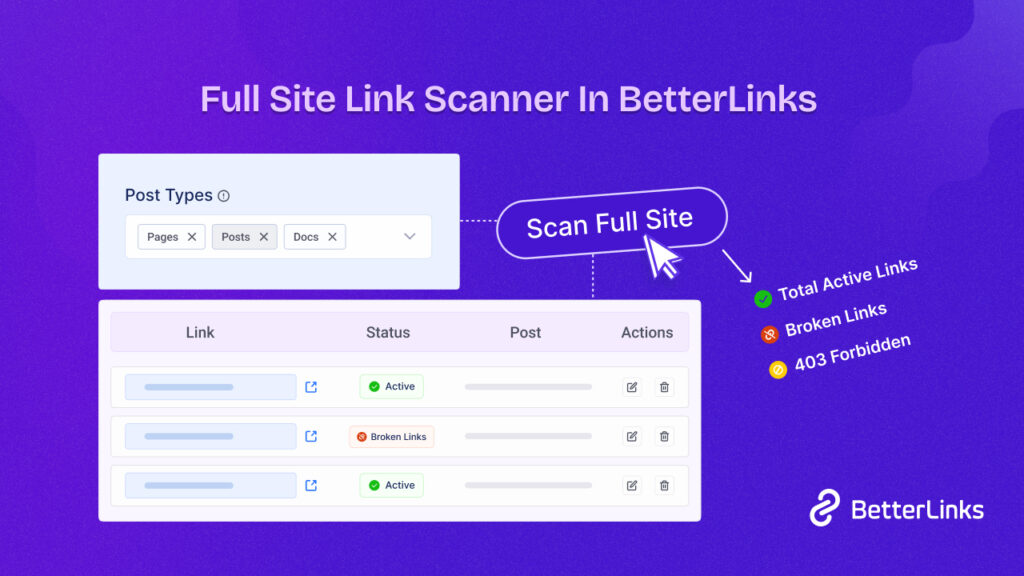
With the release of BetterLinks PRO v2.2, the Link Scanner comes into play. The feature offers you the ability to scan all the links on your website based on post types—all at once, with just a click. It instantly identifies the ‘Active Links’, ‘Broken Links’, & ‘403 Forbidden’ links of your website. The best part? From the intuitive & user-friendly interface, you can easily understand the detailed report & fix your website links if you find any issues.
![[New Feature] Introducing BetterLinks’ Full Site Link Scanner – A Feature To Make Website Link Maintenance Easy 6 full site link scanner](https://betterlinks.io/wp-content/uploads/2024/11/image-24.png)
Ensuring that your website remains in top condition is the sole priority of this feature. Despite having a Broken Links Checker feature in BetterLinks in the first place, why should you use this Full Site Link Scanner? What makes this feature stand out & a reason to upgrade to the PRO version since this is a premium feature?
- One-click Scanning—save hours of manual work with the automatic link-checking process.
- Detail Link Insights—get detailed data about each link that includes status, source, type & more.
- Partial Scan—pick whether you want to scan links created by BetterLinks or all the website links.
- SEO Performance—ensure all your links are functional to avoid SEO penalties.
- Correct Links from Dashboard—get the option to take action by either editing (to fix) or previewing your links.
Why Should You Use the Link Scanner?
Website link maintenance can feel like a never-ending chore. Manually checking each link is not just tedious—it is easy to miss errors that can hurt your site’s performance. That is where BetterLinks’ Link Scanner comes in! Here is why this feature is a game-changer:
1. Scan Your Entire Site, Hassle-Free
Are you tired of checking all the broken links, and forbidden links of your website manually? Here Link Scanner simplifies your process of manual checking & makes it automated with one click. With scanning, you can examine all your website links to check if they are functional and error-free. From internal links (connect different parts of your site) to external links (leads to other websites), it scans all to provide a seamless experience by avoiding embarrassing ‘404 errors.’
However, the Link Scanner scans all the links on your website based on Post Types. With the auditing capabilities of this feature, it guarantees you that you will never overlook links that are broken, forbidden and more to save you from manual labor & ultimately; safeguard your site’s credibility.
2. Keep Your SEO in Top Shape
When it comes to search engine rankings, broken links have an immense negative impact on them. With Link Scanner of BetterLinks, you can fix them not only quickly but also efficiently. Needless to say, search engines always favor websites whose links are well-maintained and error-free. By repairing broken or forbidden links you can easily prevent SEO penalties. Once all the website links are fixed & up and running, it boosts your site’s credibility along with the site’s page authority which strengthens your overall SEO.
![[New Feature] Introducing BetterLinks’ Full Site Link Scanner – A Feature To Make Website Link Maintenance Easy 7 full site link scanner](https://betterlinks.io/wp-content/uploads/2024/11/image-25.png)
Additionally, links that are properly functional give a seamless user experience. As a result, it makes visitors stay on your website longer by reducing frustrating dead ends. This is something search engines reward with better rankings. In simple words, Link Scanner is your site’s health consultant every time you scan.
3. Perfect for Affiliate Marketers
If you are an affiliate marketer then you know how broken links ruin your commissions. We know that you do not want to face this kind of situation & let outdated or broken links hinder your earnings. With BetterLinks’ Full Site Link Scanner, you can get quick fixes by identifying and updating those broken links.
As an affiliate marketer, you are aware that every click counts. So you need to convert that click into your earnings. To maximize your affiliate income possibilities this feature could be a great help for you. A little effort in keeping your links in check can go a long way in sustaining and growing your affiliate revenue.
4. Easy-to-Understand Reports
When it comes to managing website links, it is a mammoth task to do. With BetterLinks’ Link Scanner, managing links has never been this easy—you do not need to go through complex data or shift your gear to endless information. It delivers reports that are simple, clear, and actionable. Instantly see what is broken, or forbidden with concise status updates that highlight links needing attention.
![[New Feature] Introducing BetterLinks’ Full Site Link Scanner – A Feature To Make Website Link Maintenance Easy 8 full site link scanner](https://betterlinks.io/wp-content/uploads/2024/11/image-12.gif)
Moreover, to take immediate steps, there is an update button in the dashboard & a preview button too for having a look at how it looks after updating. It does not end here—everything is organized for your convenience—filter by link status, post type, or content type to pinpoint issues in no time. Thanks to this intuitive dashboard, anyone can manage their site’s links like a pro.
BetterLinks’ Link Scanner makes link management easy, quick, and stress-free. Whether you are running an eCommerce site, a blog, or an affiliate empire, this feature ensures your site is polished and ready to perform.
Why do it the hard way when you can let BetterLinks handle it for you?
Once you know the benefits of using this BetterLinks feature, you may want to know how this feature works. Well, head to the documentation below to learn how to configure the Full Site Link Scanner in BetterLinks.
Quick Guide: How to Configure Link Scanner in BetterLinks
Configuring the Link Scanner in BetterLinks is simple. Start by going to your WordPress dashboard, selecting the BetterLinks plugin, and clicking on the ‘Link Scanner’ option. From there, choose the post types you want to scan, such as pages, posts, or all, and click ‘Start New Scan.’
![[New Feature] Introducing BetterLinks’ Full Site Link Scanner – A Feature To Make Website Link Maintenance Easy 9 full site link scanner](https://betterlinks.io/wp-content/uploads/2024/11/image-26.png)
You can use the Full Site Link Scanner to audit all website links or the BetterLinks Broken Link Scanner for BetterLinks-specific links. After the scan, review the report to check the link status, source text, and post details. After that, you can fix broken links by previewing, rechecking, or editing them directly from the dashboard.
For a fresh start, clear logs or filter links by status for quick management. If interrupted, resume scanning effortlessly from where it stopped. With BetterLinks, managing and fixing your site’s links has never been easier. For additional assistance, reach out to our support team anytime!
👉Learn More: How Does The Link Scanner In BetterLinks Work?
Keep Your Website Links Error-Free with BetterLinks
Website maintenance is vital, and broken links can hurt your site’s performance and user experience. BetterLinks’ Full Site Link Scanner makes link audits quick and easy, saving time and boosting your SEO and credibility. Whether you are an affiliate marketer, an SEO expert, or a website owner, this tool simplifies link management with its user-friendly interface and actionable insights.
Stop wasting time on manual checks—let BetterLinks handle it for you. Hope you will like the feature and its capabilities of doing things. Do not forget to subscribe to our blogs and join our community to get the latest news & updates from BetterLinks.
Monster’s Award 2023: BetterLinks Nominated for Best WordPress Optimization Plugin!

We are thrilled to announce that BetterLinks, the leading link management plugin, has been nominated for Monster’s Award 2023 under the category ‘Best WordPress Optimization Plugin.’ This prestigious award, now in its third year, recognizes the outstanding performance and exceptional features of BetterLinks in helping website builders worldwide create, manage, and track any site URLs effortlessly.
Continue reading “Monster’s Award 2023: BetterLinks Nominated for Best WordPress Optimization Plugin!”The Ultimate Guide To GA4( Google Analytics 4) In WordPress For Beginners

On July 1, 2023, Universal Analytics (the basic version of Google Analytics) will stop receiving new data. After this time, Google Analytics 4 will be the sole Google tool available to track your website’s activities. But what does that mean for your WordPress website? Let’s find out.
Google Analytics 4’s key goal is to provide more data across the customer journey’s whole lifespan. In other words, when a customer is acquired, additional data is accessible, such as their level of engagement, monetization, and retention.
Continue reading “The Ultimate Guide To GA4( Google Analytics 4) In WordPress For Beginners”5 Best WordPress URL Redirect Checker Tools That You Should Try [2026]
URL redirect checker is essential for any online businesses or individuals to prevent content duplication of their website, for migrating from one site to another, affiliate marketing, and many others. You have to know which URL redirect checker tool will be best for you. So this blog is all about the best URL redirection checker tool that can help you out entirely. To know all details, take a deep dive into this blog.
![5 Best WordPress URL Redirect Checker Tools That You Should Try [2026] 16 5 Best URL Redirect Checker Tools](https://betterlinks.io/wp-content/uploads/2022/08/5_Best_URL_Redirect_Checker_Tools_That_You_Should_Try_1280_720-1024x576.jpeg)
Let’s first know a little bit about URL redirection, what it is and how it works actually. URL redirection is called URL forwarding. It’s a process of redirecting the users and search engines to a completely new website URL without having an error. To simplify, suppose your website is xyz.com and you want to redirect it to a new domain by (xy.com) without breaking the link.
If you redirect your link whenever your user clicks any of your old links it will direct them to your new website link except giving a 404 error or nay. Just, in that case, you have to notify search engines and your users about this by redirecting your URL and secure browsing for your website visitors.
There comes the importance of a complete URL management tool or URL redirection tool to make your website link management smooth and error-free.
Learn More: Use Cases Of Redirect 301, 302, 307 & How Do They Boost SEO
Check Some Use Cases Of URL Redirection:
There are several reasons why you will feel necessary to redirect the URL. The most important ones are highlighted below:
Helpful For Website Migration
When you are migrating your website to a new website domain. You should have to redirect your website URLs to the new one using 301, 302 0r 307 redirections. So that your visitors won’t face any errors if they click any of your old website URLs. In the meantime notifying search engines can help new website ranking constantly.
Prevent Content Duplication
You can easily prevent content duplication of the website by using 301 redirects. This is important when you are preserving similar content on multiple websites, you have to redirect URLs with 301. So that search engines can not report plagiarized content and ensure secure browsing without losing your website’s SEO value.
Manage Affiliate Marketing With Ease
Affiliate marketers benefit most from URL redirection. They can easily have their affiliate links perform that navigate to your website. When a user clicks on your link, they are immediately and almost silently routed to the tracking page of your affiliate provider. This is even before being brought back to your site.
Learn More: 7 Best Affiliate Marketing Plugins For WordPress + Growth Hacks
5 Best URL Redirect Checker Tools That You Should Try
Now that you know the use cases of different use cases, this is the time to provide your all details about the 5 best URL Redirect Checker tools that you should try for your website. Take a look below:
BetterLinks
BetterLinks is the all-in-one URL shortening, tracking, and redirection solution for WordPress users. You can use it as a URL redirect checker tool for all advanced link management work without any hassles. It helps WordPress users to short URLs, choose your preferable link redirection types, manage affiliates, marketing campaigns, and more.
It comes with an advanced data fetching function that helps fetch data without reaching your website’s direct database rather than first checking on your JSON file.
This makes this link management solution best. Because if your database is being directly hit, the first thing it will do is to make your website slow. So BetterLinks helps your website faster loading speed and efficiently manage your links all inclusively. Check out what more BetteLinks has to offer you below:
- Create, customize, shorten & redirect links
- Set up link redirection with 302, 301, or other types as per your need
- Manage links with separate categories and tags.
- Fetch data directly from JSON file & process in fast mode
- Evaluate marketing campaigns with advanced UTM builder
- Get Wildcards facility, in-built Analytics & powerful integration with Google Analytics
- Split Testing facility for dynamic URLs, and a lot more
SEO Redirect Checker
SEO Redirect Checker tool helps you to check if an URL/Page is redirected to your website. If yes, then this URL direct checker tool will display the HTTP status code and the destination URL. It will give you each of the important insights of your website link redirection and make you fix the issue to ensure secure browsing.
Redirect Tracker
Redirect Tracker tool can help you check any short or affiliate URL to view where it goes. This URL redirect checker tool is beneficial for any type of URL redirection tracking that gives you every insight.
Screaming Frog
Screaming Frog is a bulk URL redirect checker tool. It helps you check your URL redirection during the time of website URL crawling or even bulk URL uploading. You can examine up to 500 URLs with this URL redirect checker tool.
Screaming Frog shows status, status code, and redirect destination. These statuses can be either temporary or permanent. It includes those beginning with 301, 302, 303, and 307. This URL redirect tool can also help you find loops or track different redirect chains to their destination and many more.
SmallSEOTools Redirect Checker
SmallSEOTools URL Redirect Checker tool is completely free that can help you check your website redirections and gives you insights into your redirect chain. You just need to add your website URL specifically that is included on the website and click the redirection button. After finishing the process, search results will indicate the redirect type and the redirect URL with a lot more.
Now It’s Your Turn To Explore!
Hope you find this helpful and feel free to share your thoughts with us by commenting below. If you want to read more exciting blogs, visit our blog page, and join our Facebook community to get along with all WordPress experts.
How to Add Links On YouTube: Different Ways

Pretty sure you have already seen to add links on YouTube videos while browsing your favorite YouTube channels. Have you wondered how you also can add clickable links on your YouTube videos? Today we are going to share all the different ways to do that. Let’s get started.

Why Should You Consider Adding Clickable Links In Your YouTube Videos?
Nowadays, YouTube has become one of the most popular marketing tools for content creators and digital marketers. You may wonder while seeing others add clickable links to their YouTube videos, why they do so. The following are the top benefits of adding links to your YouTube videos so that you will be able to benefit from them the same way that others do.
🎯 Your goal with a YouTube channel might be to get more views so you can make more money. In such a case, you can promote your other videos on YouTube, so the audience will stay on your channel for longer.
🎯 When the purpose of uploading a YouTube video is to sell products or services, then you can add clickable links and easily redirect them to the desired landing page. The links mentioned in the YouTube video are hard to remember just after watching the video. Also, your users can’t copy URLs directly from videos. So adding clickable links is the best way.
🎯 Sometimes, It’s not possible to represent in-depth tutorials in the videos. In these cases, if you have documentation or blogs regarding the topic, then adding clickable links on YouTube videos will guide your audience more thoroughly. Thus video engagement, as well as audience satisfaction level, will also increase.
How to Add Links On YouTube [5 Ultimate Ways]
Time to explore all different ways to add links on YouTube Videos. In this guideline, we have covered all the possible ways to add clickable links. Let’s check them out.
1. Add Clickable Links To YouTube Video Descriptions
Adding links to YouTube video descriptions is a constant way to show clickable links. While you have video-related blogs, documentation, etc. to your video, you can easily mention them. Also, for branding purposes, you can mention the landing page link, product page link, support link, and so on. The most important thing is, you can add as many links as you want in a YouTube video description.
You have to add links on YouTube video descriptions while publishing or scheduling the video to publish. To do that, click on the ‘Create’ button from the studio and upload the video. Instantly a popup will appear. From there in the Details section, you can add clickable links for your YouTube video. Then click on the ‘Next’ button and provide all other details.
Another way to add links on YouTube video descriptions is after publishing the video. From the YouTube Studio, you can add clickable links on videos any time you want and modify them. Don’t forget to save changes after modification. Also, need to mention that, you can add links in description on YouTube for free, no need to join the YouTube Partner Program.
2. Add Clickable Links On YouTube Cards
Cards are the best way for cross-promotion strategy in your YouTube videos. You can add other channels or your channel’s names, videos, or links to the cards. To add links on YouTube cards, you have to join the YouTube Partner program. Unless the option to add links won’t show to you.
You have to add links to your YouTube video from Video Elements section. After giving the video details, this section will appear. Select Cards from there.
Now, add the links on your YouTube video. You can add multiple clickable links in multiple time lengths of your video. Here is the preview of how to add links on cards.
3. Add Links To YouTube Video End Screens
To add links on YouTube video end screen, you have to join YouTube Partner program as well. Without it, the option to add links to your end screen won’t come. In the same process from the Video Elements section, you have to choose End Screen and add clickable links there. Also need to keep in mind, you have to keep the end screen for more than 5 seconds to add links.
4. Add Links To YouTube Video Comments
Adding clickable links in YouTube video comments is one of the popular strategies to increase engagement in the comment section. Moreover, the link doesn’t go away in the middle or beginning of the YouTube video. A comment box is a constant place, so viewers can redirect to that mention anytime they want. In addition, you can pin your comment, so that it will appear at the top of the comment section.
To add links to YouTube video comments, go to one of your published YouTube videos. Then in the comment section add links and click on the ‘Comment’ button. That’s it.
5. Add Links Via QR Code On YouTube Video
Suppose, you don’t have access to add links on YouTube cards or the end screen. That means you can’t add links in the middle of the video. In this kind of scenario, you can still add links via QR code. First, generate the QR code of the link you want to add to your video, then add the screen on the video while editing. After that, your audience can easily redirect to the given link by scanning the QR code.
Guideline To Add Clickable Links: Types Of Links You Can Add
Above mentioned ways are the ultimate ways to add links to YouTube videos. Though you can’t just link to your videos. If you add spam or misleading links then your video performance will degrade and you won’t get enough views for your channel. Here is the list of links you can and should add links on YouTube.
1. Your own verified and associated website
2. E-commerce and crowdfunding sites approved by respected organizations
3. Videos from other YouTube channels
Bonus: Add Pretty Links On YourTube With Link Shortener
Only when you add links on YouTube video descriptions and comments, the total URL is shown. Sometimes URLs are unmasked as well as long as 100+ characters. That definitely looks ugly and most of the time considered as an unimportant or spam link. And failed to create credibility thus the audience. Moreover, sometimes it’s quite impossible to guess what the link represents. In these kinds of cases, you can easily turn your clickable links into Pretty links with the link shortener plugin, BetterLinks.

With this stunning link shortener plugin you can turn any link short and with a pretty appearance. That also represents links in a trustable way. Moreover, by reading the shortened URL link, the audience easily gets a clear idea of where the link is redirecting. BetterLinks also allows you to set scheduling links, run split tests, social media campaigns, and so on. In one word, this link shortener plugin can be called the ultimate link management plugin.
To create short links with this link shortener plugin, all you have to do is install and activate the plugin, and create new shortener links. Also, if you want to add links with QR codes, then BetterLinks allows to generate QR codes as well.
To boost your YouTube channel, adding multiple clickable links on video comes in handy in many ways. Thus following any of the ways you can easily add links to YouTube videos. And a link shortener plugin will increase the interactivity of added links as well.
Don’t forget to share your favorite ways of adding links to YouTube videos. Also, subscribe to our blog to get more of these kinds of tutorials, and more.
The Pros and Cons of Link Shortening: Ultimate Guide for Marketers
When it comes to measuring the effectiveness of your social media marketing campaigns, link shortening and link management tools can help you plan and implement better digital marketing strategies. It’s a core job for a marketer to share their content in the most attractive and readable way to grab more leads & conversions. If you are wondering what will be the advantages and disadvantages of using URL shorteners, then this post is for you.
Continue reading “The Pros and Cons of Link Shortening: Ultimate Guide for Marketers”