Managing a few short links manually is manageable. But when your website, affiliate campaigns or marketing efforts grow, creating links one by one quickly becomes time-consuming.
Whether you are migrating from another platform, organizing a large library of URLs or setting up links for a new campaign, bulk link management can save valuable time. To help streamline this process, BetterLinks helps you import short links using CSV files directly from your WordPress dashboard.
This guide will help you understand how to import short links using CSV in BetterLinks so you can manage large volumes of URLs quickly and efficiently without manual effort.
How to Import Multiple Short Links Using CSV in WordPress [Within 3 Steps]
Importing short links using a CSV file in BetterLinks is simple and takes only a few minutes. The process is designed to help you move from a spreadsheet to live short links without any complex setup.
A quick step by step guide to get started:
Follow the steps below to import short links into your WordPress site using BetterLinks.
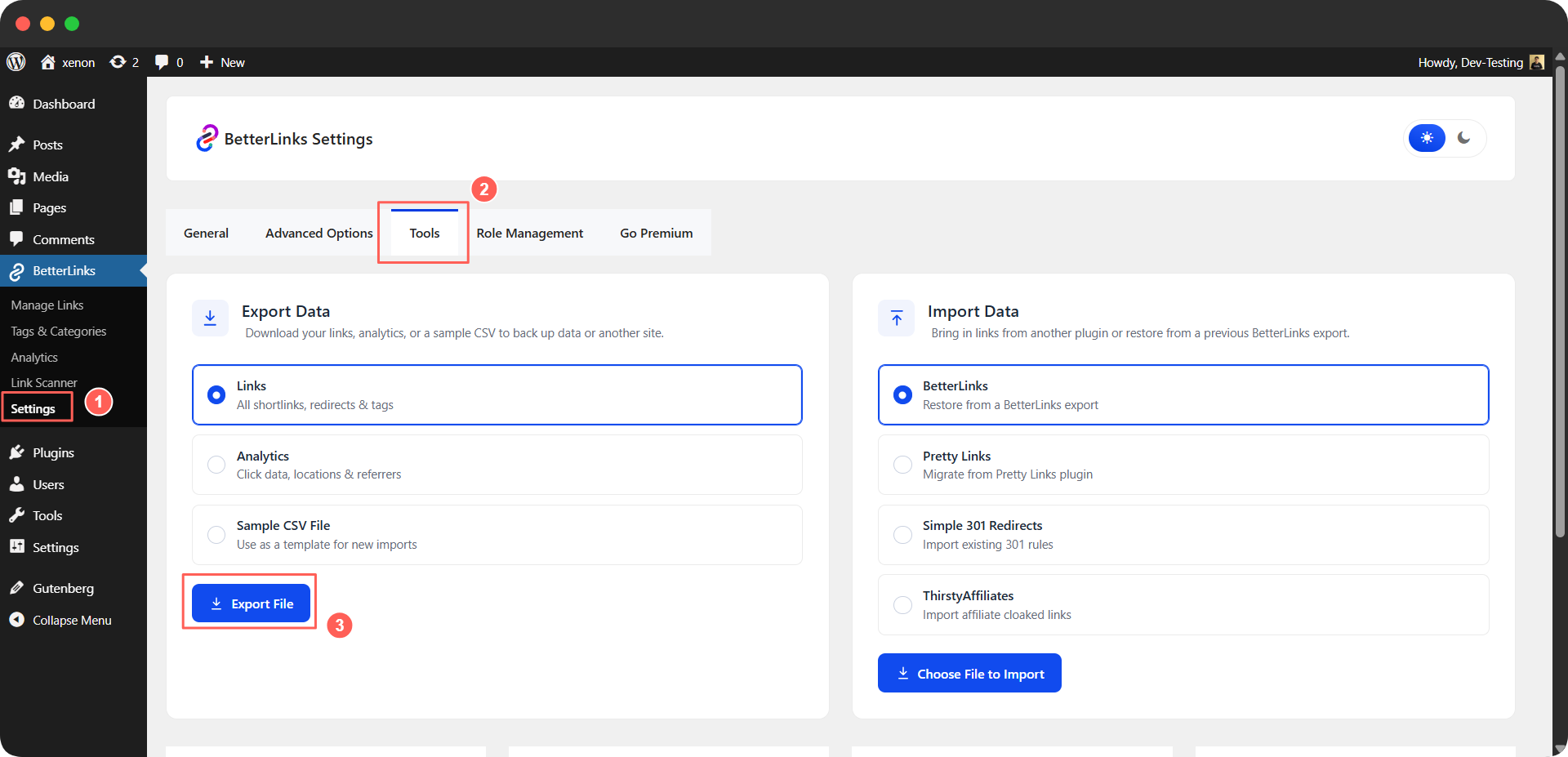
Step 1: Export Your Links
Go to the Tools section inside BetterLinks and open the Export tab. Select Links from the available options under Export Data and click Export File to download your CSV.
Step 2: Customize the Exported CSV
Open the downloaded file in Excel, Google Sheets or any spreadsheet tool. Find the links you just created and edit them as needed.
If you are creating links for the first time, they will appear at the top of the file. For existing exports, new links may appear at the bottom.
You can update fields such as URLs, titles and slugs, then save the file in .csv format.
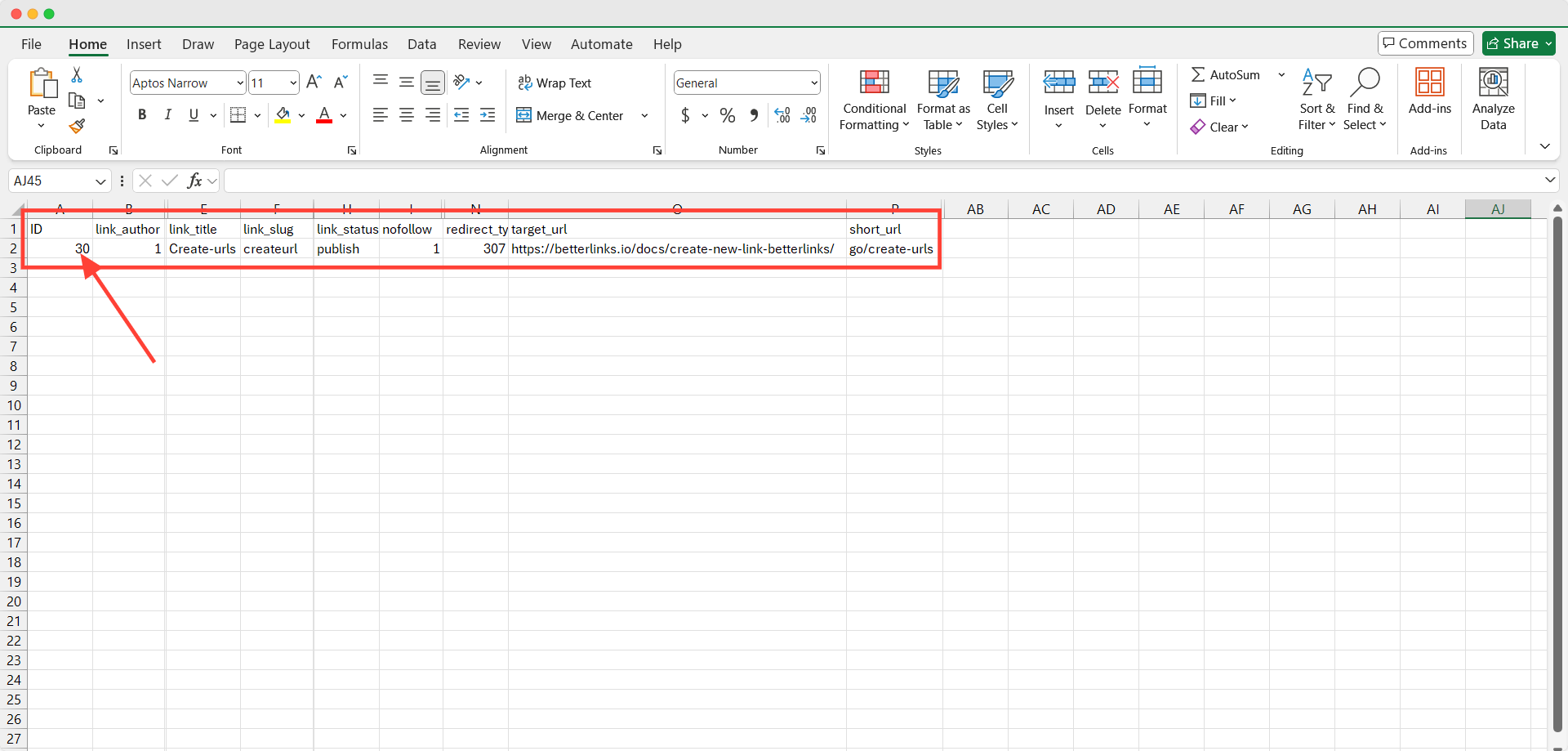
Make sure each link has a unique ID to avoid duplicates.
Step 3: Import the Customized CSV with Field Mapping
Go back to Tools and then Import in BetterLinks and upload your updated CSV file.
Once uploaded, the Map CSV Columns window will appear. BetterLinks will automatically match recognized fields, and you can manually map any missing ones.
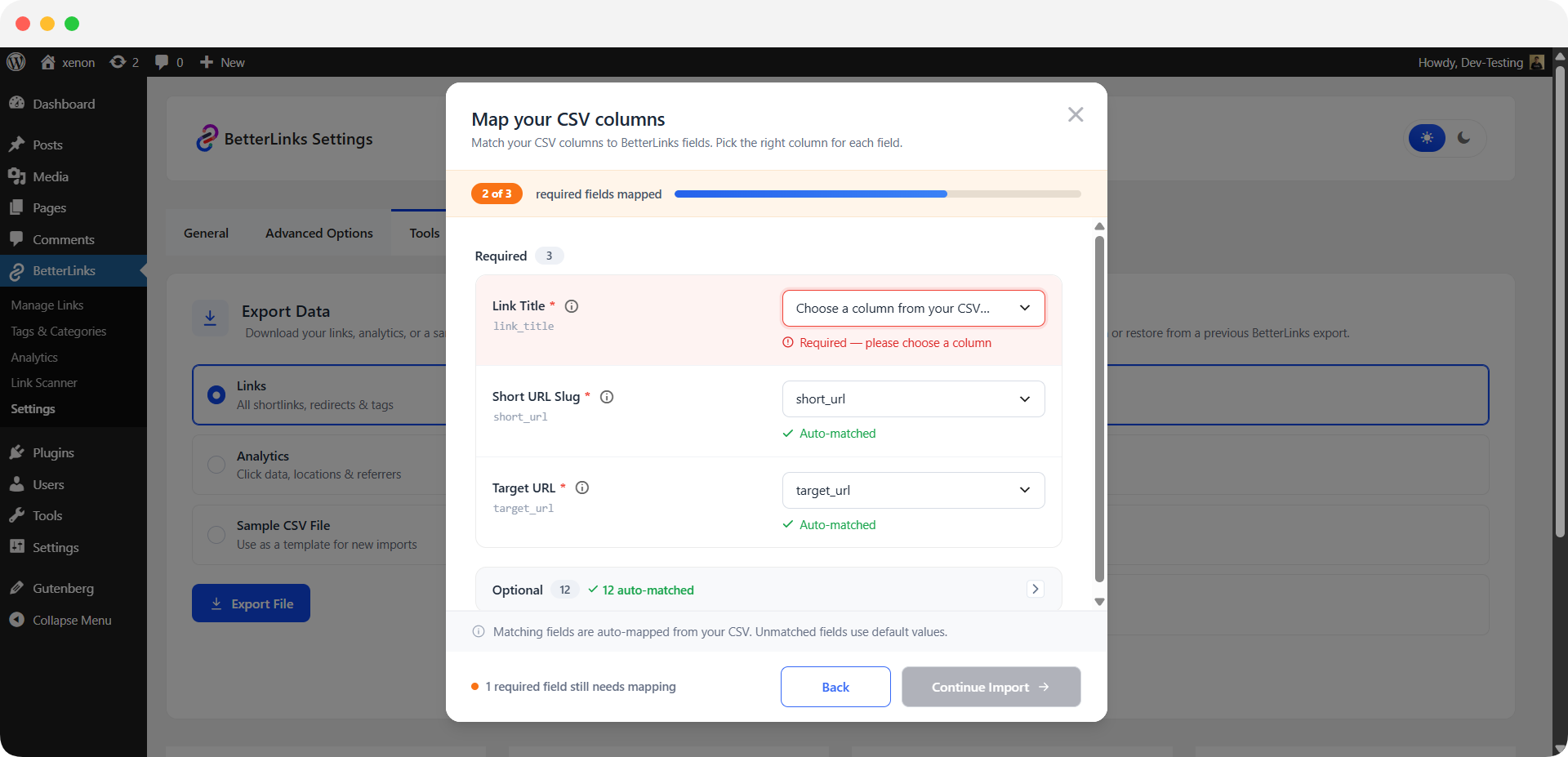
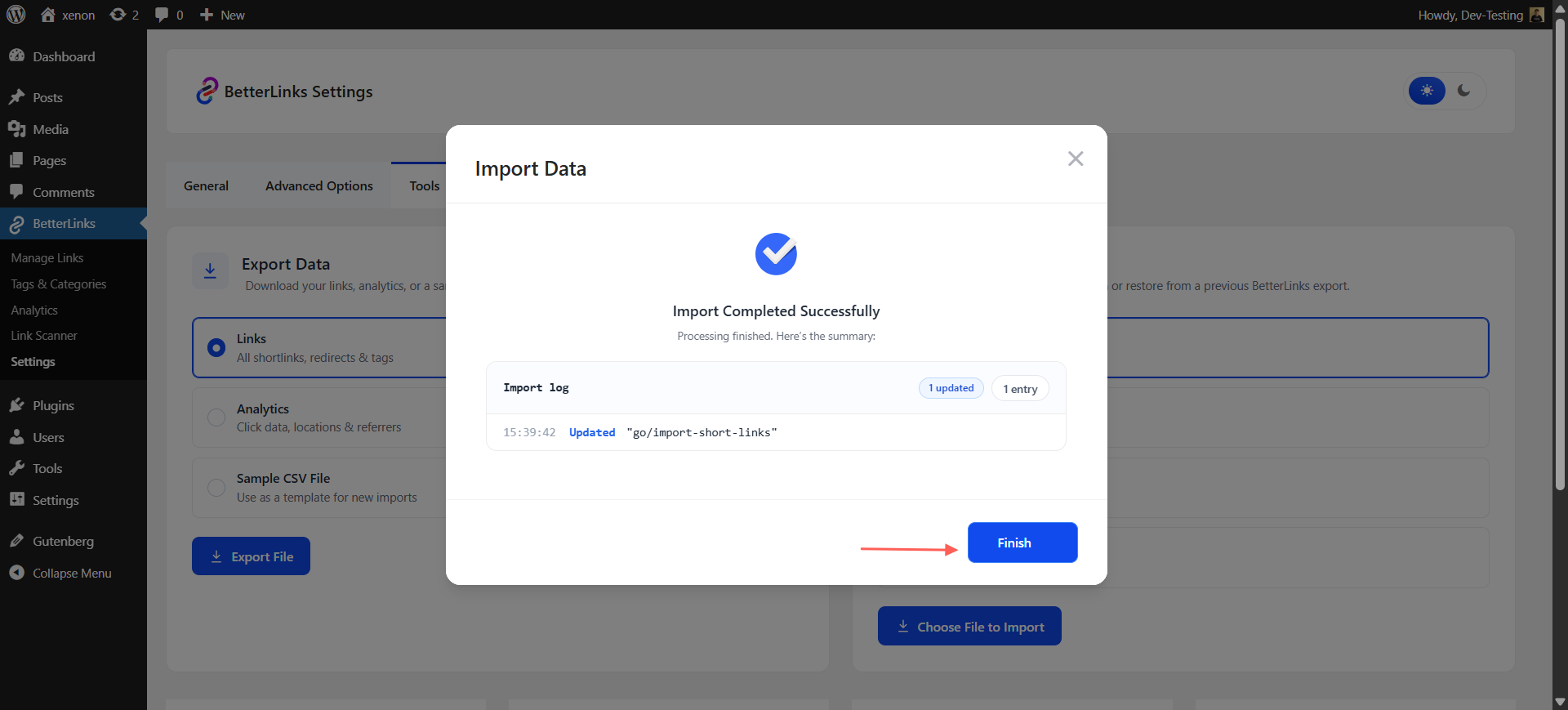
After reviewing everything, click Continue Import to start the process. When finished, you will see a success message. Click Finish to close it.
For a detailed walkthrough with examples and advanced configuration options, check out the documentation on how to import short links using CSV files in BetterLinks.
Key Benefits of BetterLinks CSV Import Feature
CSV Import is designed to make large-scale link management simple and accessible for WordPress users. From agencies handling client projects to marketers running campaigns, the feature helps reduce workload while maintaining accuracy.
Growing websites often rely on hundreds of branded URLs, affiliate links and marketing redirects. Organizing these links manually can quickly become difficult.
With BetterLinks CSV Import, you can manage large collections of short links through a structured spreadsheet workflow. This makes it easier to prepare, edit and upload links in bulk without disrupting your existing processes.
Bulk Import Multiple Links at Once
Upload multiple short links from a single CSV file instead of creating them individually. This allows you to launch campaigns faster and manage larger projects more efficiently.
Flexible Data Customization
Before importing, you can modify your spreadsheet to include the information you need. This flexibility gives you greater control over how links are organized inside BetterLinks.
Automatic Field Recognition
BetterLinks can recognize and map supported CSV fields during the import process. This helps speed up setup and reduces the effort required to match data manually.
Scalable Link Management
As your website and marketing activities expand, CSV imports provide a reliable workflow for maintaining and growing your link library without increasing manual effort.
Prepare Link Data Offline
Teams can organize link information in spreadsheets before importing. This allows for faster reviews and collaboration before links are published.
Keep Link Structures Consistent
Using a CSV file helps standardize naming conventions, slugs and destination URLs across all imported links, creating a cleaner link management system.
Who Can Benefit from CSV Link Import?
Bulk importing links is valuable for anyone who manages URLs at scale. As your content, campaigns and website structure grow, handling links manually becomes harder to maintain. This feature is designed to simplify that process and support faster workflows across different roles.
Affiliate Marketers
Affiliate marketers often deal with hundreds of product links across multiple platforms and campaigns. Managing them one by one can slow down execution and increase the chance of broken or inconsistent links.
With CSV import, you can upload large batches of affiliate links in one go, organize them by campaign and keep your tracking structure clean. This makes it easier to launch new promotions quickly and maintain control over your entire affiliate link system.
SEO Professionals
SEO teams rely heavily on structured internal linking and well-managed external references. As the number of pages grows, maintaining link consistency becomes a continuous task.
CSV Import helps SEO professionals manage large link datasets efficiently. You can organize internal and external URLs in advance, import them in bulk and ensure your link structure stays clean and scalable across the entire website.
Agencies
Agencies often manage multiple client websites, each with its own set of URLs, campaigns and tracking needs. Manually creating links for every project can slow down onboarding and delivery timelines.
With bulk CSV import, agencies can migrate and set up client link structures faster. It simplifies large-scale onboarding and allows teams to handle multiple projects without repetitive manual setup.
Content Marketing Teams
Content marketing teams frequently launch campaigns that require multiple URLs across blogs, landing pages and promotional materials. Managing these links individually can delay publishing schedules.
CSV Import helps teams prepare all campaign URLs in a spreadsheet and upload them at once. This keeps workflows organized, reduces setup time and allows faster campaign execution across content channels.
Get Started with BetterLinks CSV Import Today
Managing large numbers of short links does not have to be a repetitive process. BetterLinks CSV Import gives you a faster way to upload, organize and manage link data directly from WordPress.
Whether you are migrating existing links, launching a new campaign or scaling your website, this feature helps reduce manual work while improving efficiency.
To learn how to configure and use the feature, check out the BetterLinks documentation and start importing your short links with ease.
Is this blog helpful? Join our community to stay updated with the latest blogs, product reviews and WordPress solutions. Subscribe to our blog for in-depth tutorials, tips and product demos or visit our website for the newest updates.