You can now monitor website links automatically in WordPress using BetterLinks. Running a WordPress site takes effort but link health often gets ignored. Broken links, redirects and dead URLs can quietly hurt SEO and drive visitors away. The good news is you do not need to check them manually anymore. Automated monitoring keeps your site clean, healthy and always optimized.
![How to Monitor Website Links Automatically in WordPress [New Feature]](https://betterlinks.io/wp-content/uploads/2026/05/image-2.jpeg "How to Monitor Website Links Automatically in WordPress [New Feature] 7")
This guide walks you through everything you need to know about automated WordPress link monitoring, how it works, why it matters and how to set it up step by step using BetterLinks.
How to Monitor Website Links Automatically with BetterLinks
BetterLinks helps you automate full site link scanning and receive detailed reports directly in your email inbox. Instead of manually checking links across your website, you can schedule automatic scans to detect broken URLs, redirect issues and overall link health problems before they impact user experience or SEO performance.
Step 1: Configure Scheduled Scan
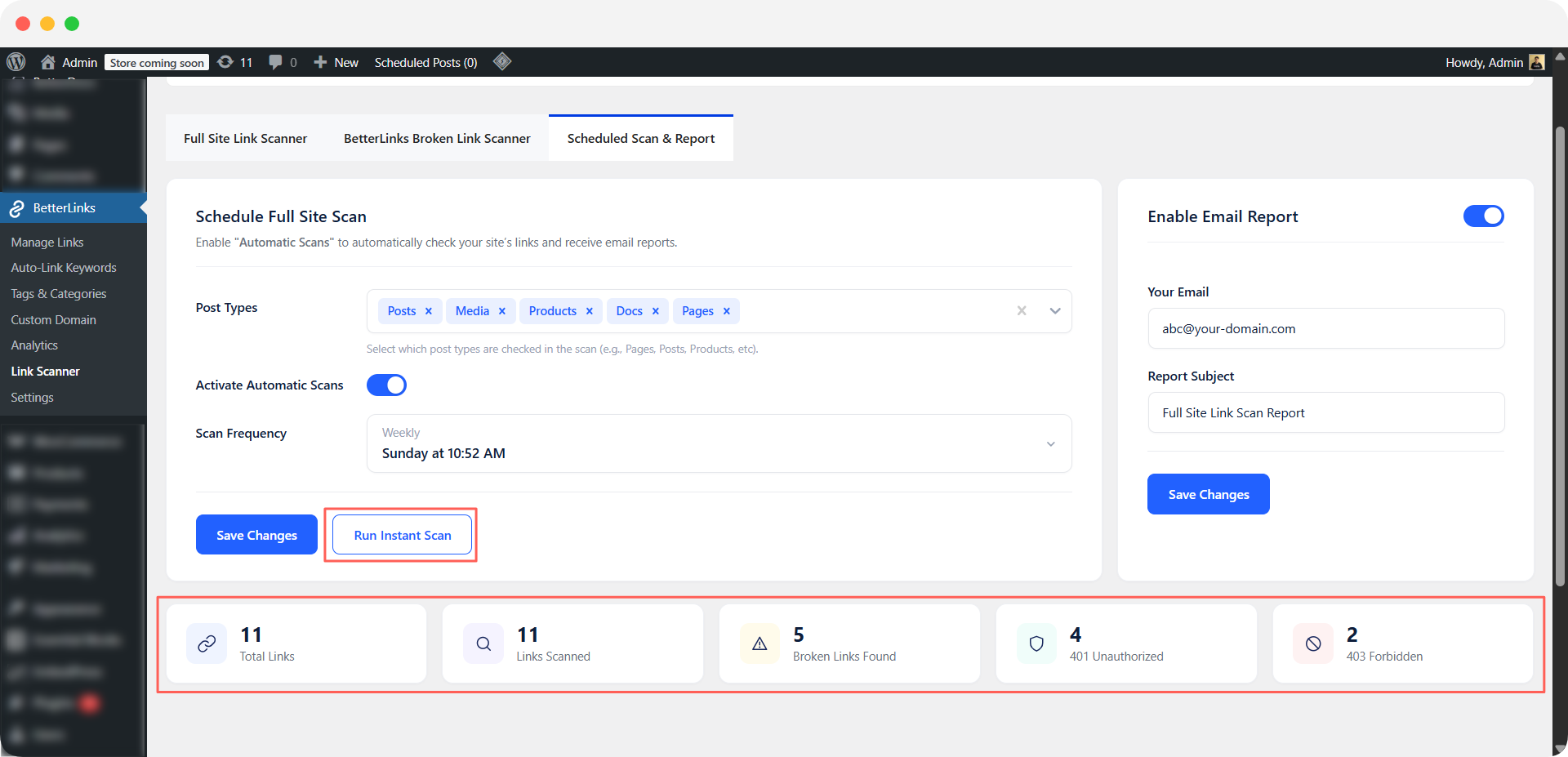
Log in to your WordPress dashboard and navigate to ‘BetterLinks,’ then ‘Link Scanner.’ Locate and click on the ‘Scheduled Scan & Reports‘ option.
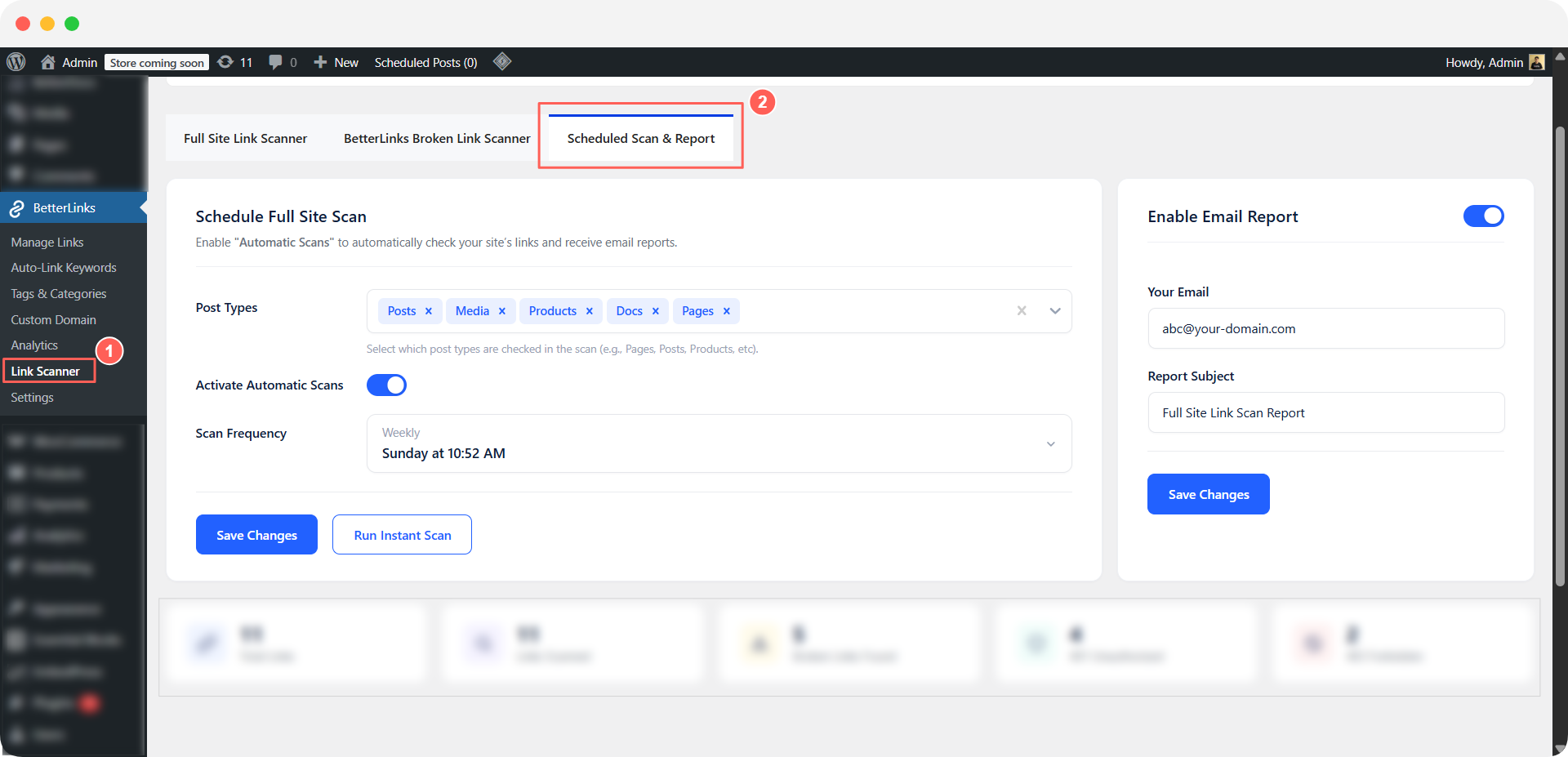
Enable ‘Activate Automatic Scans‘, then select the desired ‘Post Types‘ and ‘Scan Frequency’ from the dropdown menu. Click Save Changes to apply the settings.
Post Types
Select exactly which parts of your WordPress site should be included in the scan so you can focus on what matters most. This helps you control scan scope and improve accuracy.
- Posts to monitor blog articles and ensure all internal and external links inside content are working properly.
- Pages to check essential site pages like landing pages, about pages and service pages where broken links can directly impact conversions.
- WooCommerce Products to validate product pages, ensuring pricing links, images and external references remain functional for a smooth shopping experience.
- Custom post types to cover any additional content structures created by themes or plugins, so no hidden links are missed during scanning.
Scan Frequency
Define how often your website should be scanned to maintain consistent link health without manual effort. This allows you to balance performance, update speed and monitoring needs.
- Daily for high-traffic or frequently updated websites where new content and links are added regularly and require constant monitoring.
- Weekly for most business websites where moderate updates happen and a balanced scanning cycle is enough to catch issues early.
- Monthly for smaller or static websites where content changes less often and periodic checks are sufficient to maintain link health.
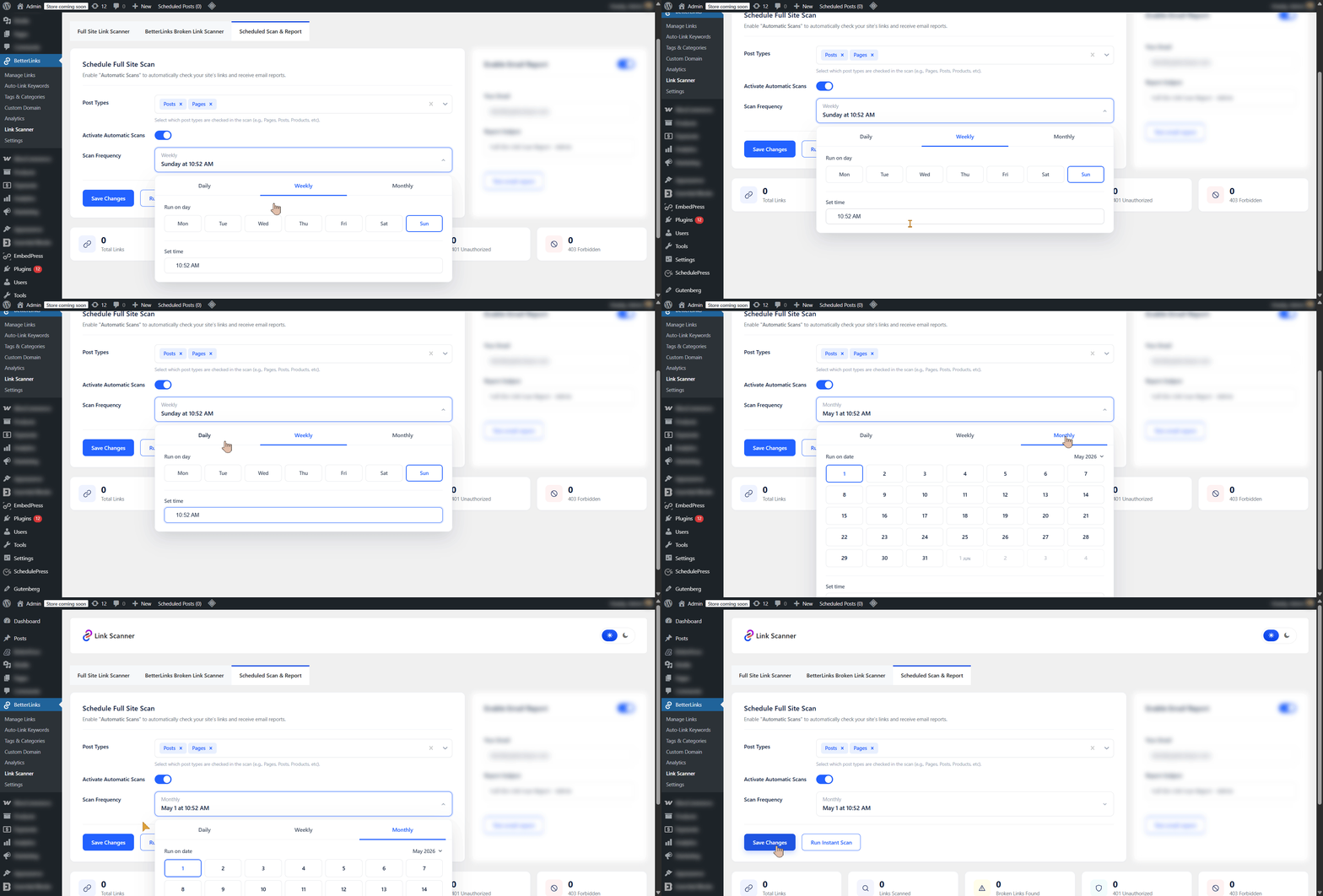
Click Run Instant Scan to check your site’s link health in real time. This provides an instant overview of Total Links, Links Scanned, Broken Links Found and status codes such as 401 Unauthorized and 403 Forbidden.
You can also click Test Email Report to instantly receive a scheduled scan report in your inbox.
Step 2: Configure Email Reports
Now move to the final step and enable the ‘Email Report’. A default email address from your site will be added automatically, along with a default subject line using the site owner’s name. You can update both fields based on your preferences.
The report will be sent automatically to your preferred email address after each scheduled scan.
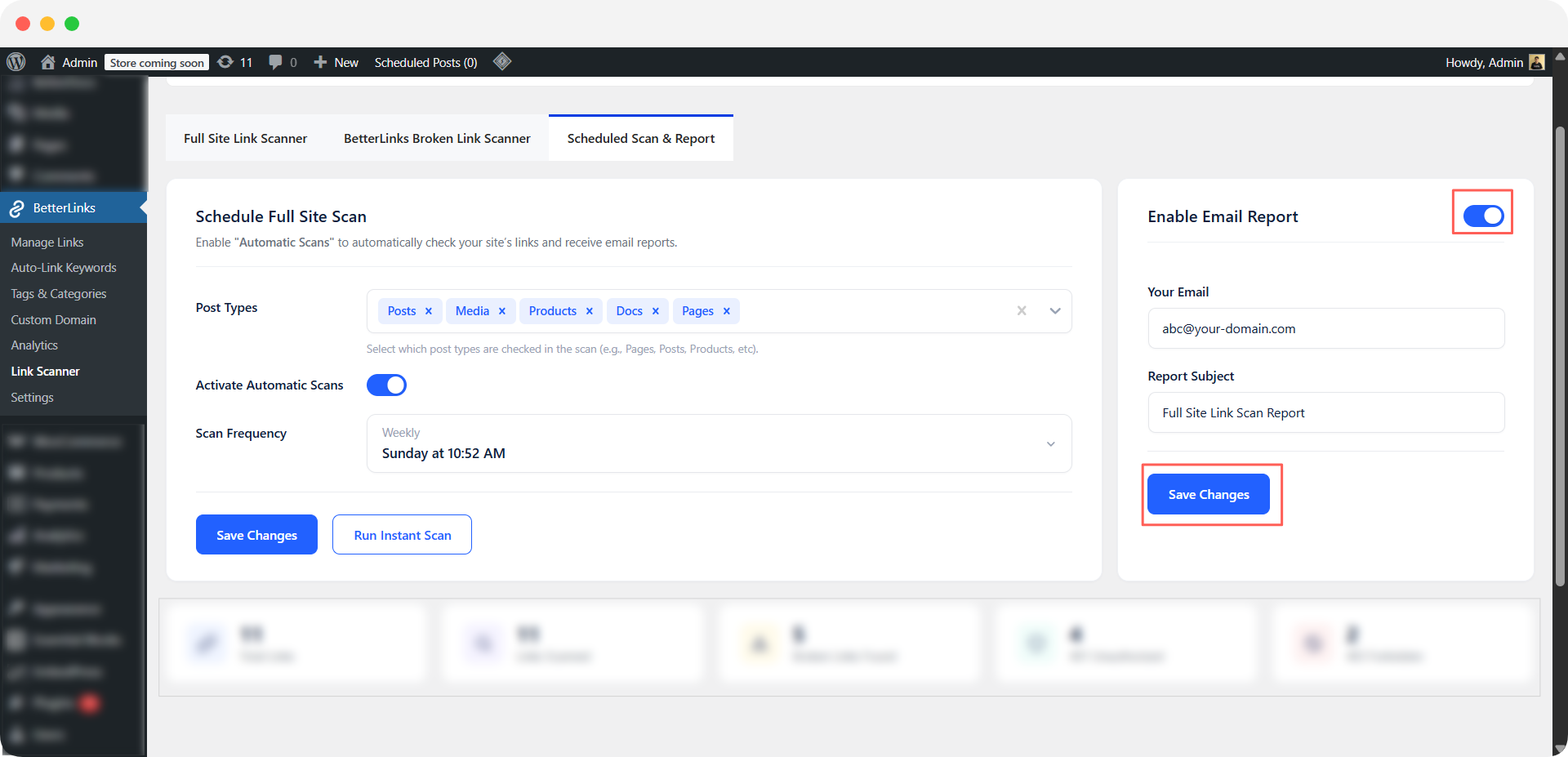
This is how you can easily set up and use Scheduled Scan & Reports in WordPress. Check out the documentation to learn more and feel free to share your feedback with our support team.
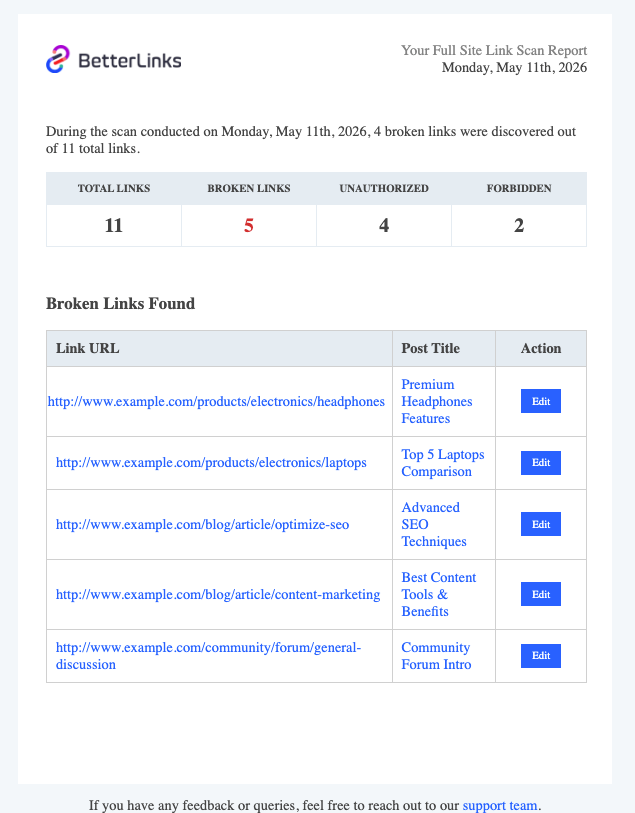
What BetterLinks Detects During a Link Scan?
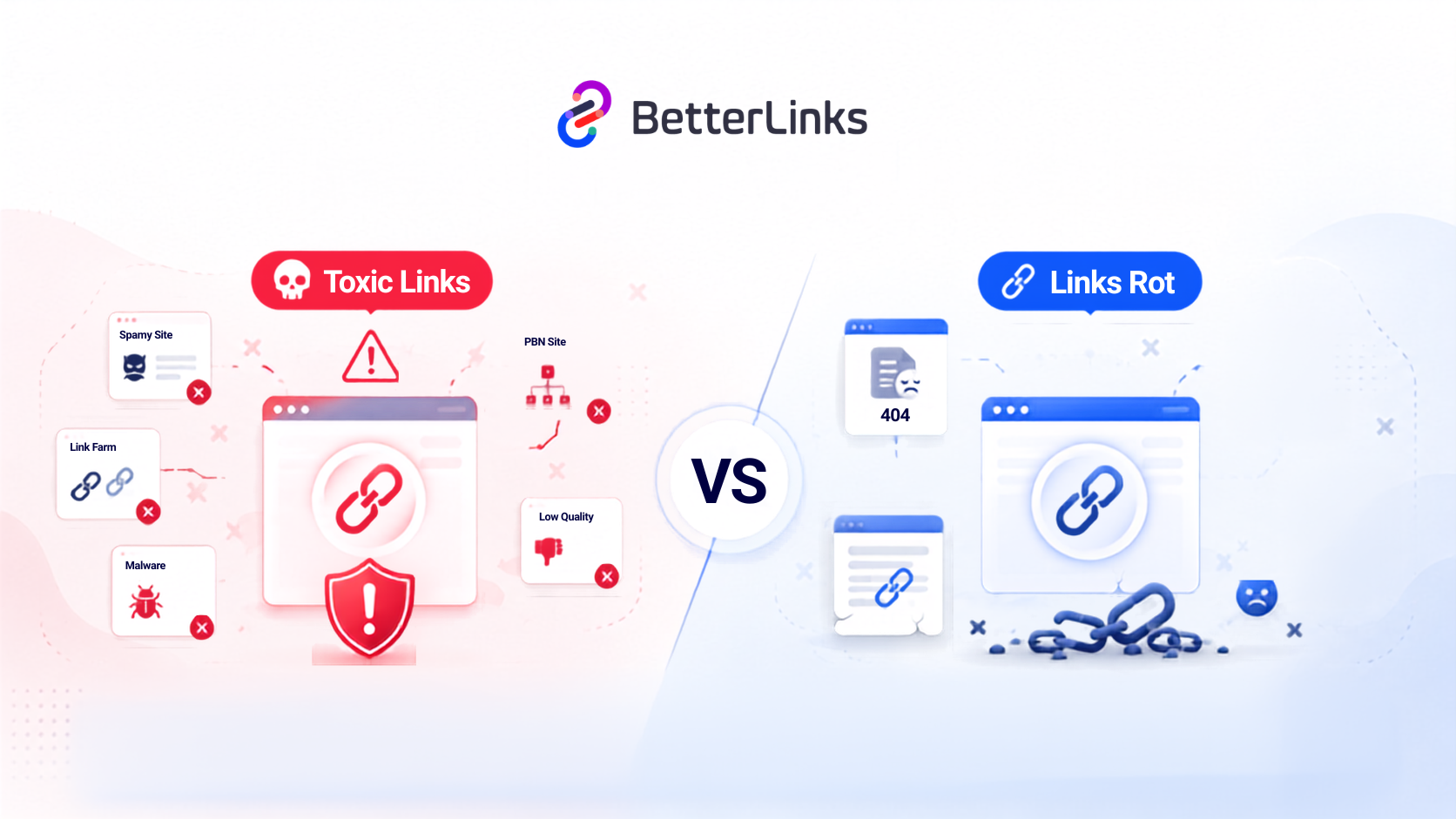
A link scan in BetterLinks goes beyond basic checks. It reviews every URL across your site to identify issues that can affect SEO, user experience and site performance. From broken links to redirect errors, it gives you a clear view of your website’s overall link health in seconds.
Each of these issues has a different impact on your SEO and user experience. BetterLinks categorizes them clearly so you know exactly what needs to be fixed first.
A breakdown of what BetterLinks identifies during a full site scan:
- 404 Not Found: The destination URL no longer exists or has been moved without a redirect
- 301/302 Redirects: Links that redirect to another page, which may create redirect chains or loops
- 401 Unauthorized: The target URL requires authentication and is not publicly accessible
- 403 Forbidden: The server is blocking access to the target URL
- Broken Internal Links: Links within your own site that lead to deleted or unpublished content
- Broken External Links: Links pointing to third-party sites that have gone offline or changed their URL structure
BetterLinks Scheduled Scan vs. Manual Link Checking
Managing website links can be done in two ways: either through manual checks or automated scanning. This section compares BetterLinks Scheduled Scan with manual link checking to show how automation saves time, reduces errors and keeps your site consistently healthy without constant effort.
The difference is clear. Automated link scanning in WordPress saves time, improves accuracy and gives you consistent visibility into your site’s link health.
What it looks like to check links manually versus using BetterLinks’ automated feature 👉🏻
| Factor | Manual Checking | BetterLinks Scheduled Scan |
| Time required | Hours per check | Zero manual effort |
| Frequency | Irregular and often forgotten | Daily, Weekly or Monthly automatically |
| Coverage | Incomplete and error-prone | Full site scan across all content types |
| Reports | No automatic reports | Detailed email reports after every scan |
| Real-time checks | Not possible | Run Instant Scan available anytime |
| Cost | Your time and labor | Included in BetterLinks PRO |
Top WordPress Users Who Benefit from Automated Link Scanning
BetterLinks link monitoring feature is designed for a wide range of WordPress users. Here is a quick breakdown of who benefits most:
- Bloggers and content creators who publish regularly and link to external resources that can go dead over time. Regular scanning protects their content quality and SEO rankings.
- Affiliate marketers who rely on product links to generate income. A broken affiliate link means lost revenue, and automated monitoring ensures every link stays active.
- Digital agencies managing multiple client websites. Scheduled scan reports make it easy to deliver regular link health updates to clients without manual effort.
- WooCommerce store owners who have product pages, external vendor links and category pages that change frequently. Automated scanning keeps the entire store in check.
- SEO professionals looking for a reliable website link audit WordPress tool that integrates directly with the platform they already use.
Never Let Broken Links Go Unnoticed Again
Link-related issues are among the most common yet ignored SEO problems in WordPress. They quietly damage your SEO, frustrate your visitors and cost you money if affiliate or product links stop
Is this blog helpful? Join our community to stay updated with the latest blogs, product reviews and WordPress solutions. Subscribe to our blog for in-depth tutorials, tips and product demos or visit our website for the newest updates.